SMS Opt-In Documentation
Last updated: March 2026
For carrier compliance review: This page documents how septic service companies using the SepticCycle platform collect, record, and manage SMS consent from their customers. SepticCycle (operated by C3IO) is the technology provider. The individual septic service businesses operating on this platform are the message senders.
Platform Overview
SepticCycle is a B2B field service management platform used by independent septic service companies to manage customers, schedule jobs, send invoices, and communicate with property owners. SMS messages are sent by individual septic service businesses (the operators) to their own customers (residential and commercial property owners) using Twilio-powered 10DLC phone numbers assigned to each company.
SepticCycle does not send messages directly to end consumers. Each septic service company on the platform operates its own messaging under its own registered brand. Consent is collected by the service company from their customers before any messages are sent.
Opt-In Methods
Method 1: Digital Contract Signing (Primary Method)
When a customer receives a service agreement signing link from their septic service provider, the customer-facing signing page includes an optional, unchecked-by-default SMS opt-in checkbox. The customer must actively check this box themselves on their own device. The checkbox is never pre-checked, never required for service, and is entirely separate from the service agreement being signed.
No staff member checks this box on the customer’s behalf. Consent is recorded with a server-side timestamp at the moment the customer submits the signing form with the box checked. The consent record is stored in the customers table with the following fields: sms_consent = true, sms_consent_date (ISO 8601 timestamp), and optionally sms_phone if the customer provides a mobile number on the signing form.
Exact Opt-In Language Presented to the Customer
“I consent to receive SMS appointment reminders and service notifications from [Company Name]. Msg & data rates may apply. Message frequency varies (typically 1–5 messages per service event). Reply STOP to unsubscribe or HELP for assistance. See SMS Terms.”
[Company Name] is dynamically replaced with the actual septic service company name at the moment the signing page is rendered for the customer.
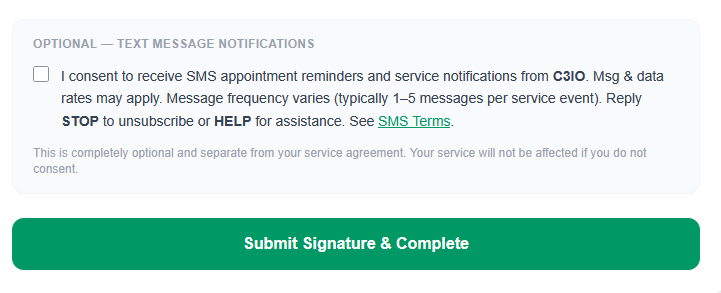
Above: Screenshot of the live customer-facing opt-in section at www.septiccycle.com/sign/[contract-id]. The checkbox is unchecked by default. The customer checks it themselves on their own device — no staff member checks this box on the customer’s behalf.
Method 2: Keyword Opt-In (START)
Customers may text STARTto the septic service company’s assigned 10DLC phone number at any time to opt in to SMS notifications.
Automated Reply to START
“You have opted in to receive service notifications from [Company Name]. Msg & data rates may apply. Msg frequency varies. Reply STOP to unsubscribe or HELP for assistance.”
Disclosures Presented at the Point of Opt-In
All consent methods present the following disclosures to the end user at or before the moment consent is recorded:
- Business identity:Messages are sent by the customer’s specific septic service provider (company name is always included in messages).
- Message frequency: Varies based on service activity. Typical usage is 1–5 messages per service event.
- Rates: Message and data rates may apply.
- Opt-out: Reply STOP at any time. No further messages will be sent after opt-out is received.
- Help: Reply HELP for assistance.
Opt-Out and HELP Handling
STOP (Opt-Out)
When a customer replies STOP to any message, the system immediately records the opt-out, suppresses all future messages to that number, and sends the following confirmation:
Automated STOP Reply
“You have been unsubscribed from [Company Name] notifications. No further messages will be sent. Reply START to re-subscribe.”
HELP
When a customer replies HELP, the system responds with:
Automated HELP Reply
“For help with SMS notifications from [Company Name], contact [company phone]. For SepticCycle platform support: support@septiccycle.com. Msg & data rates may apply. Reply STOP to unsubscribe.”
START (Re-Opt-In)
Customers who have previously opted out may re-subscribe at any time by replying START. Upon receipt, the system reinstates their consent record and responds with the standard opt-in confirmation shown above.
Message Types Sent
All messages are transactional and service-related. No marketing or promotional messages are sent through this platform.
- Appointment reminders (upcoming scheduled service)
- Technician en-route notifications
- Job completion confirmations
- Invoice delivery and payment reminders
- Service scheduling confirmations
Sample Messages
Appointment Reminder
“Hi John, this is a reminder that Smith Septic Service has your septic pumping scheduled for tomorrow, March 17 between 9am–11am. Reply STOP to unsubscribe.”
Technician En Route
“Your technician from Smith Septic Service is on the way and will arrive in approximately 30 minutes. Reply STOP to unsubscribe.”
Invoice / Payment Reminder
“Invoice #INV-0042 for $275.00 from Smith Septic Service is due. Pay online: [link]. Reply STOP to unsubscribe.”
Consent Is Voluntary
Opting in to SMS notifications is entirely voluntary. Customers who do not consent receive the same level of service with no restrictions. SMS consent is never bundled with any service contract, terms of service, or other agreement.
Related Policies
- SMS Terms & Conditions — Full terms governing text message communications
- Privacy Policy — How customer data, including phone numbers, is collected, used, and protected
Contact
For questions about this documentation or SepticCycle’s messaging practices:
SepticCycle
Email: support@septiccycle.com
Website: www.septiccycle.com